Heading to college? Be prepared for the typical rites of passage: decorating your dorm room, choosing your classes and buying textbooks. And when it comes to buying textbooks from the campus store, some things never change like long lines, limited supplies and heavy backpacks. Or do they?
Rolling out this week, you can now rent or purchase digital textbooks from the Books section on Google Play. We have a long list of publishing partners, and we’re launching with a comprehensive selection of higher education titles from science and mathematics to history and English, and everything in between.
All your textbooks, anywhere you go
With digital textbooks, there’s no need to worry about which ones you have with you and which ones you left in your dorm room. Because your library is stored in the cloud, you have instant access to the titles you need—when you need them—on your Android tablet, phone, iOS device and on the web. Now an overstuffed backpack is a thing of the past with all your textbooks weighing as much as the device you’re reading them on.
Take great notes, stay organized
With the Google Play Books app, you have convenient tools at hand to make studying simpler and faster. You can instantly search within a textbook for a particular word or phrase, bookmark chapters and pages, highlight and annotate key passages and get quick access to dictionaries, translation tools, Wikipedia and Google search.
Rent and save
Need your textbooks for just a semester or two? You can rent any textbook on Google Play for six months and save up to 80% as compared to buying print textbooks.
Shop for textbooks today on Google Play, and learn more at our Google in Education site.
Posted by Scott Dougall, Director, Product Management
Jumat, 09 Agustus 2013
Jumat, 02 Agustus 2013
Find your lost phone with Android Device Manager
Have you ever lost your phone in between the couch cushions or forgot it in a restaurant? Or maybe searching for your phone before you rush out the door is part of your morning routine? Let the new Android Device Manager help you out! It's one of a few simple features you can use to keep your device—and the data you store inside—safe and secure.
Locate and ring your misplaced device
If you ended up dropping your phone between those couch cushions, Android Device Manager lets you quickly ring your phone at maximum volume so you can find it, even if it's been silenced. And in the event that your phone or tablet is out of earshot (say, at that restaurant you left it at last night), you can locate it on a map in real time.
Protecting your personal information and data
While losing your phone can be stressful, Android Device Manager can help you keep your data from ending up in the wrong hands. If your phone can’t be recovered, or has been stolen, you can quickly and securely erase all of the data on your device.
Availability and getting started
This service is now available on devices running Android 2.2 or above; to use it, you also will need to be signed into your Google Account. There will also be an Android app to allow you to easily find and manage your devices. Stay tuned!
Posted by Benjamin Poiesz, Product Manager, Android
Updated August 7 to reflect availability of Android Device Manager. Access it at www.android.com/devicemanager.
Rabu, 24 Juli 2013
Introducing Android 4.3, a sweeter Jelly Bean
Today we’re releasing Android 4.3 — an upgrade to Jelly Bean that introduces a number of new features, including restricted profiles. Android 4.3 also adds Bluetooth Smart support (a.k.a Bluetooth Low-Energy); the latest in 3D graphics through OpenGL ES 3.0; and more.
Restricted profiles for tablets
Lightweight and portable, tablets are perfect for sharing with others. Last October we added support for multiple users. Each person has a separate space and can freely customize the tablet experience, from lockscreen to wallpaper, apps and folders.
In Android 4.3, we're introducing restricted profiles, which let you manage per-user access to apps and content. Restricted profiles can be used in any number of situations. For example, restricted profiles enable parental controls, so certain family members are prevented from accessing mature content. Alternately, retail stores can use tablets as kiosks that show product information, or shops can use tablets as point of sale systems, all while limiting access to apps.
To set up restricted profiles on your tablet, go to the Users section under Settings. Learn more.
Bluetooth Smart support (a.k.a. Bluetooth Low-Energy)
Fitness sensors and other devices that use Bluetooth Smart technology open the door for a whole new class of mobile applications. Bluetooth Smart minimizes power usage while measuring and transmitting data, making both sensors and the phones or tablets connected to them more battery-efficient.
With Android 4.3, Nexus 4 can now connect to Bluetooth Smart sensors. Runtastic and many other developers are making Android apps compatible with these sensors.
Accelerated 3D graphics with OpenGL ES 3.0
Devices like the new Nexus 7 support OpenGL ES 3.0, the latest industry standard for accelerated 3D graphics. This brings photorealism to a whole new level in the games you're playing: blades of grass on the soccer field come alive, asphalt on the street looks real as you screech by, stubble on a villains' face almost pokes out of the screen. And with sophisticated effects like self-shadows, that villain looks even more menacing, casting a shadow on himself.
Dial pad autocomplete
With Android 4.3 we’ve introduced a new autocomplete feature in the dial pad. Just start touching numbers or letters and the dial pad will suggest phone numbers or names. To turn on this feature, open your phone app settings and enable “Dial pad autocomplete”.
Improved support for Hebrew, Arabic, Hindi, and more
We’ve made major progress on enabling right-to-left layouts across the platform user interface: dialer, home and lock screens, settings, and more. This work builds on the support that we introduced for right-to-left layouts for Hebrew and Arabic speakers in Android 4.2. We’ve also added support for Hindi, Afrikaans, Amharic, Swahili, and Zulu.
There’s more to Android 4.3 than we can fit in this post, so for a detailed list of changes, click here.
Android 4.3 is now rolling out now to Nexus devices, and will be available on the new Nexus 7 and Google Play edition devices soon. Let us know what you think on our Google+ page for Android.
Posted by Dave Burke and Gabe Cohen, Android Platform team
From TVs to tablets: Everything you love, across all your screens
When I was growing up, my family had a single screen we huddled around every day: the television set in the living room. Nowadays, we “huddle” around multiple screens—laptops, smartphones and tablets—using them almost interchangeably as we navigate through our day. In a world of ubiquitous computing, life would be a lot simpler if we didn’t have to learn new behaviors and interfaces each time we switched screens—if we could have one consistent, intuitive experience no matter where we are or what we’re doing. Today, with the launch of Chromecast and the new Nexus 7 tablet, it’s even more effortless to enjoy content you care about—whether it’s video, music, movies, games—wherever you are, across your devices. Introducing ChromecastTo help make it easy to bring your favorite online entertainment to the biggest screen in your house—the TV—we’re introducing Chromecast. Chromecast is a small and affordable ($35) device that you simply plug in to your high-definition (HD) TV and it allows you to use your phone, tablet or laptop to "cast" online content to your TV screen. It works with Netflix, YouTube, Google Play Movies & TV, and Google Play Music, with more apps like Pandora coming soon. With Chromecast, we wanted to create an easy solution that works for everyone, for every TV in the house.
Remote-freeOnce your Chromecast is set up, you can use your phone, tablet or laptop to browse and cast content to your TV, play and pause, control the volume, and more. But unlike other streaming solutions, you can still multitask—send emails or surf the web—while enjoying what’s on the TV screen. It works across platforms—Android tablets and smartphones, iPhones, iPads, Chrome for Mac and Windows (more to come), so your personal device is also now your remote control. Cast the web to your TVIn addition to apps like Netflix, you can use Chromecast to bring a broad range of content available on the web to your big screen, thanks to a new feature in the Chrome browser that allows you to project any browser tab to your TV. From sharing your family photos to enjoying a video clip from your favorite news site, it’s as simple as pressing a button. This feature is launching in beta, but we’re excited for people to try it out and give us their feedback.
Google Cast SDK preview for developersTo ensure a great Chromecast experience over time, we've built Google Cast, a technology that enables developers to build consistent, intuitive multi-screen experiences across mobile devices and TVs. Today, we’re launching a preview version of Google Cast with more information for developers on our Google Developers blog. A handful of early developers are already working on enabling Google Cast technology in their apps, so more supported apps are coming soon. And while the Chromecast device is the first instantiation of Google Cast, we expect the technology to be embedded in a range of hardware from our partners in the future.
The new Nexus 7—the sharpest 7” tablet screen everTogether with ASUS, we took what you loved about the original Nexus 7 and made it even better. The first thing you’ll notice is the sharpness of the screen: the 323 pixels packed into every inch of the screen makes it the world's highest-resolution 7-inch tablet. It’s lighter than ever, with more than nine hours of HD video playback and 10 hours of web browsing or reading. Nexus 7 now features stereo speakers and virtual surround sound from Fraunhofer (the inventors of the MP3 format), giving you rich and immersive audio. Android 4.3—a sweeter Jelly BeanNexus 7 is the first device to ship with Android 4.3, the newest version of Android. Tablets are perfect for sharing with others, so in Android 4.3, we're introducing restricted profiles, which let you limit access to apps and content. For example, restricted profiles enable parental controls, so certain family members are prevented from accessing mature content. Likewise, retail stores can use tablets to show off product information, and shops can use tablets as point of sale systems. Android 4.3 also now supports Bluetooth Smart technology, opening the door to mobile apps that connect to new devices like fitness sensors. Android 4.3 is rolling out to Nexus devices starting today. Ready to PlayThe new Google Play Games app brings your friends together with the games you love, where you can invite a friend and start challenging gamers around the world, compete for top achievements, and race to the top of the leaderboard. You can also enjoy the world’s largest collection of eBooks, listen to millions of music tracks and immerse yourself in thousands of movies, TV shows, magazines and apps on Google Play. Plus, Nexus 7 comes loaded with your favorite Google apps, like Chrome, Maps, YouTube, Gmail and Google Now.
How to get Chromecast and the new Nexus 7Starting today, the Chromecast device is available for $35 on Google Play, Amazon.com and BestBuy.com. It will be available in Best Buy stores across the U.S. starting July 28. For a limited time, you also get three months of Netflix included. More info available in Google Play. Nexus 7 starts at $229, and is available in the U.S. beginning July 30 (with more countries coming soon!). Buy Nexus 7 online on Google Play, or check it out at Best Buy, Gamestop, Walmart, Staples, Office Max, Office Depot, Amazon, Home Shopping Network, Radio Shack, J&R and B&H Photo. Nexus 7 (LTE) is coming soon with support for T-Mobile and Verizon in the coming weeks. Learn more on our Nexus site.
Rabu, 29 Mei 2013
Google Calendar Update for Android: Custom Colors and More
One of the most requested features we’ve seen so far for Google Calendar on Android is the ability to customize event and calendar colors directly from your device. Today’s update allows you to do just that. Now you can highlight those super-urgent meetings and important birthdays, or just switch up the color of your calendar whenever your heart desires.
Adding events is now easier and more fun with our redesigned date and time pickers, which let you schedule your special dinner date or the start of your well-deserved vacation in a snap.
For all of you world travelers, our redesigned timezone picker makes it simpler to find the region that you’re looking for, whether you’re in San Francisco, Tokyo or Zurich.
Finally, it’s easier to schedule repeating events. You can now set events to repeat every Tuesday and Thursday, every month, or every 7 weeks, it’s completely up to you.
The latest version of Google Calendar is built for devices running Android 4.0.3 and above (Android 4.1 or higher for custom event colors). Get it on Google Play, rolling out over the course of the day, and let us know what you think.
Posted by James Kung, Software Engineer
Rabu, 22 Mei 2013
A smoother Drive app for Android
(cross-posted to the Google Drive Blog)
The process of creating and accessing your stuff shouldn’t be, well...a process. Today, the Drive app for Android is getting several improvements to make creating and accessing your stuff on-the-go even easier.
To help you find the content you care about, Drive files will now be displayed in a clean, simple card-style. You can swipe between files to see large previews that let you quickly review and discover the information you’re looking for. And if you want to keep some Drive files on your Android device, you’ll now be able to “download a copy” from the actions menu inside settings.
The updated Drive for Android app also gives you to a way to keep track of important paper documents like receipts, letters, and billing statements. Simply click “Scan” from the Add New menu, snap a photo of your document, and Drive will turn the document into a PDF that’s stored for safekeeping. And because Drive can recognize text in scanned documents using Optical Character Recognition (OCR) technology, a simple search will retrieve the scanned document later. No more frantic scrambling through drawers looking for a receipt or digging through your pockets to find that business card -- just scan, upload and search in Drive.
The editing experience in Google Sheets has also gotten some improvements: now you can adjust font types and sizes for a spreadsheet and tweak the cell text colors and cell alignment right from the app. Plus, the Drive app comes with Cloud Print support so you can print anything from Drive with a Cloud Ready printer -- perfect if you need to, say, print that extra resume right before a job interview.
Get the Google Drive app today on Google Play and circle us on Google+ for continued updates.
Posted by Denis Teplyashin, Software Engineer
Rabu, 15 Mei 2013
Android@I/O: Just press Play
As our developer audience knows, Android is more than simply a phone or tablet. It’s a platform, an ecosystem, and an opportunity for developers around the world to build exciting services and apps that reach millions of people every day. The flexibility and openness of Android provides developers--and Google, through services like Google Now--the opportunity to build simple, beautiful experiences across multiple devices.
Here’s a quick look at what we announced today at Google I/O, our annual developer conference:
Developers, the heart of Google Play
Just a year after launch, there are now more ways than ever for developers to monetize their apps in Google Play, and for users to discover and enjoy apps and entertainment. We’ve passed 48 billion app downloads, with more than 2.5 billion downloads in the last month alone. Today, we launched a range of new tools, including services for game developers. For users, this means that you’ll be able to challenge your friends on Google+ to real-time multiplayer competitions, or race against them to the top of the leaderboards. (Check out a few of our favorites: World of Goo, Super Stickman Golf 2, Beach Buggy Blitz, Eternity Warriors 2, and Osmos).
Our library is your library: Google Play Music All Access
Google Play Music All Access is a new monthly music subscription service that lets you listen to millions of songs across your devices. You can create a radio station from any song or artist you love, browse recommendations from our expert music team or explore by genre. And when millions of songs just aren’t enough, Google Play Music lets you combine our collection with your own collection. You can store 20,000 songs for free in the cloud and listen to them alongside the All Access catalog. It’s $9.99 a month, and you can try it free for the first month. Or better yet, start your trial by June 30 and you’ll pay only $7.99 a month.
Google Play for Education: Android goes to school
Imagine a world in which all classrooms and students are connected to the web. While such a vision will take the efforts of many, Google has contributed to this endeavor through Google Apps and Chromebooks. Today we are excited to expand Google’s education offering by combining the ease and portability of Nexus tablets with highly engaging educational content. Through this new program educators will be able to manage tablets and discover, purchase, and distribute content through Google Play for Education--whether they're in charge of one classroom or one thousand. We’re inviting developers to get started now to create world class educational apps for grades K-12. Schools interested in learning more can sign up here.
Samsung Galaxy S4 on Google Play
Next month, we are adding a new Android device to the store to join our current lineup of Nexus phones and tablets. We’ve worked closely with Samsung to create a special Samsung Galaxy S4 exclusively for Google Play. It brings together cutting edge hardware from Samsung with Google’s latest software and services -- including the user experience that ships with our popular Nexus devices. Starting June 26, it will be available with no contract for $649, supporting both T-Mobile and AT&T, with LTE.
Hugo Barra VP, Product Management, Android
Selasa, 09 April 2013
A fresh new look for Google Play
Whether you’re in the mood to listen to Justin Timberlake’s new album, read Harlan Coben’s latest bestseller or discover a new game to play, you want the experience of finding and making your purchase to be quick and easy. Today we’ve started rolling out a redesigned Google Play store on Android phones and tablets that is simple, clean and — most importantly — helps you find great entertainment, fast.
The new design focuses on bigger images that jump off the page. Similarly themed content is grouped together so you can hone in on a magazine to read or an app to try. As you move down the page, new recommendations continue to appear so there is always more to see and explore. We’ve also simplified purchasing so you can breeze through checkout and get to enjoying your movie rental or other content.
The redesigned Google Play store app starts rolling out today for Android phones and tablets running Android 2.2 (Froyo) and above. People around the world should see it over the next few weeks. Get ready for a simpler Google Play.
Posted by Michael Siliski, group product manager for Google Play
The new design focuses on bigger images that jump off the page. Similarly themed content is grouped together so you can hone in on a magazine to read or an app to try. As you move down the page, new recommendations continue to appear so there is always more to see and explore. We’ve also simplified purchasing so you can breeze through checkout and get to enjoying your movie rental or other content.
Posted by Michael Siliski, group product manager for Google Play
Rabu, 27 Maret 2013
Get inside your favorite movies with Google Play
“What’s his name again? Wasn’t he the guy in that movie with the battle of the bands?” Now, while you're watching a movie on Google Play, you can find out that it’s Jack Black (of course!), who was born in Hermosa Beach and is 43 years old. And with one click you can search the web and learn the fun fact that his parents are both rocket scientists.
We’ve added info cards to the Google Play Movies & TV app so you can easily learn more about the actors, related films and even what song is playing in many of your favorite movies. When you’re watching a film on your tablet, simply press pause and cards will pop up with information about actors on screen. You can tap on an actor’s face to learn more about him, like his age, place of birth, his character in the movie, and his recent work, or scroll through the info cards to learn more about the movie or soundtrack. When you resume the movie, the cards will disappear.
This new feature is offered for hundreds of movies in Google Play and we’re adding more every day. If you’re in the U.S. and have a tablet running Android 4.0 (Ice Cream Sandwich) and higher, download the latest version of the Google Play Movies & TV app to check it out. We hope to bring info cards to more movies in more countries and devices soon.
Posted by Ben Serridge, Product Manager for Google Play
The World’s Languages in Your Pocket (No Internet Required)
Have you ever found yourself in a foreign country, wishing you knew how to say "I'm lost!" or "I'm allergic to peanuts”? The Internet and services like Google Translate can help—but what if you don't have a connection?
Today we're launching offline language packages for Google Translate on Android (2.3 and above) with support for fifty languages, from French and Spanish to Chinese and Arabic.
You can select [Offline Languages] in the app menu to see all the offline language packages available for download. To enable offline translation between any two languages, you just need to select them in the offline languages menu. Once the packages are downloaded, you're good to go.
While the offline models are less comprehensive than their online equivalents, they are perfect for translating in a pinch when you are traveling abroad with poor reception or without mobile data access.
So go out and explore another language or another culture without worrying about Internet access. There’s a whole world offline out there.
Posted by Minqi Jiang, Associate Product Manager
Rabu, 20 Maret 2013
Google Keep--Save what’s on your mind
Every day we all see, hear or think of things we need to remember. Usually we grab a pad of sticky-notes, scribble a reminder and put it on the desk, the fridge or the relevant page of a magazine. Unfortunately, if you’re like me you probably often discover that the desk, fridge or magazine wasn’t such a clever place to leave the note after all...it’s rarely where you need it when you need it.
To solve this problem we’ve created Google Keep. With Keep you can quickly jot ideas down when you think of them and even include checklists and photos to keep track of what’s important to you. Your notes are safely stored in Google Drive and synced to all your devices so you can always have them at hand.
If it’s more convenient to speak than to type that’s fine—Keep transcribes voice memos for you automatically. There’s super-fast search to find what you’re looking for and when you’re finished with a note you can archive or delete it.
Pro tip: for adding thoughts quickly without unlocking your device there's a lock screen widget (on devices running Android 4.2+).
Google Keep is available on Google Play for devices running Android 4.0, Ice Cream Sandwich and above. You can access, edit and create new notes on the web at http://drive.google.com/keep and in the coming weeks you'll be able to do the same directly from Google Drive.
Posted by Katherine Kuan, Software Engineer
To solve this problem we’ve created Google Keep. With Keep you can quickly jot ideas down when you think of them and even include checklists and photos to keep track of what’s important to you. Your notes are safely stored in Google Drive and synced to all your devices so you can always have them at hand.
If it’s more convenient to speak than to type that’s fine—Keep transcribes voice memos for you automatically. There’s super-fast search to find what you’re looking for and when you’re finished with a note you can archive or delete it.
Changing priorities isn’t a problem: just open Keep on your Android phone or tablet (there’s a widget so you can have Keep front and center all the time) and drag your notes around to reflect what matters. You can choose the color for each note too.
Pro tip: for adding thoughts quickly without unlocking your device there's a lock screen widget (on devices running Android 4.2+).
Google Keep is available on Google Play for devices running Android 4.0, Ice Cream Sandwich and above. You can access, edit and create new notes on the web at http://drive.google.com/keep and in the coming weeks you'll be able to do the same directly from Google Drive.
Posted by Katherine Kuan, Software Engineer
Rabu, 06 Maret 2013
Celebrating Google Play’s first birthday
Accessing digital entertainment should be simple, whether you like to read books on your tablet, listen to music on your phone and computer, or watch movies on all three. That’s why one year ago today we launched Google Play, where you can find and enjoy your favorite music, movies, books and apps on your Android phone and tablet, or on the web.
Google Play has grown rapidly in the last year, bringing you more content in more languages and places around the globe. In addition to offering more than 700,000 apps and games, we’ve partneredwith all of the major music companies, movie studios and publishers to bring you the music, movies, TV shows, books and magazines you love. And we’ve added more ways for you to buy them, including paying through your phone bill and gift cards, which we're beginning to roll out in the U.K. this week.
Since no birthday is complete without presents, we’re celebrating with a bunch of special offers across the store on songs, TV shows, movies and books. We’re even offering a collection of games with some fun birthday surprises created by developers.
It’s been a busy year, but we’re just getting started. We look forward to many more years of bringing you the best in entertainment!
Posted by Jamie Rosenberg, VP of Digital Content, Google Play
Rabu, 13 Februari 2013
New Google Now: More of the information you need, at just the right time.
When computers do the hard work, you can get on with the things that matter in life. Google Now helps you do just that, giving you the information you need, before you even have to ask. Like updating you with flight times, pulling up your boarding pass when you arrive at the airport, or showing you the weather at your next travel destination. Today, we’re making Google Now even more useful by integrating new partners and making all your information even easier to access.
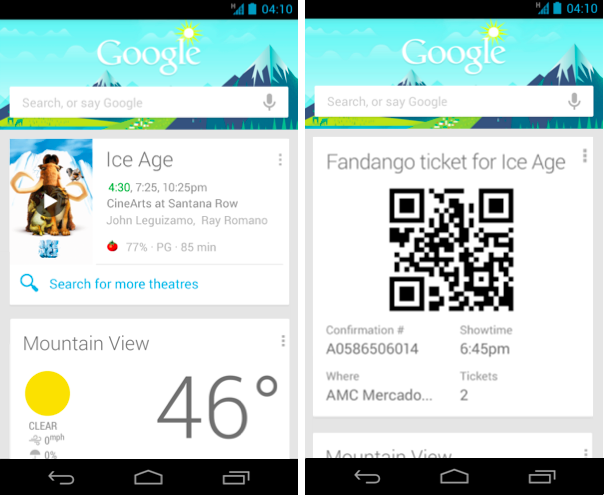
Going to the movies? Movie cards now include the latest ratings from Rotten Tomatoes, so you can pick the right movie. Purchase your tickets through Fandango, and Google Now will remind you when you need to leave for the theater, and pull up your tickets once you arrive.
In the market for a new home? Google Now can provide you with nearby real estate listings from Zillow. Plus, when you are checking out that remodeled kitchen at the open house, Now will automatically pull up more information about the listing.
Of course, all of this information is most helpful when it’s front and center and ready when you are. The new Google Now widget brings all your important Now cards to your home or lock screen, so you don’t even have to open the app.
When Google Now first launched last summer, we promised it was just the beginning, and it would continue to get better at delivering you more of the information you need, before you even ask. This is the fourth update since launch, and we’re just getting started!
To try out these new cards, get the latest version of the Google Search app for Android, available on Google Play for devices running Android 4.1 and above.
Posted by Baris Gultekin, Product Management Director
Kamis, 13 Desember 2012
Introducing Magazines on Google Play for the UK
Following hot on the heels of the recent launch of music on Google Play in the UK, we’re pleased to announce that from today, you’ll also be able to buy digital versions of your favourite magazines for reading on the go.
Popular titles from some of the world’s leading publishers such as Condé Nast UK, Dennis Publishing, Future, Haymarket, Hearst UK, Immediate Media and IPC Media are now available for purchase on your Android phone or tablet.
Get in shape with Men’s Fitness, cook up a storm with olive, work off all that turkey and Christmas pudding with Slimming World, catch up on the latest must-have gadgets with T3 and read a preview of The Hobbit in this month’s edition of Total Film.
You can stay abreast of the week’s key events with Hello!, New Statesman and The Spectator and keep on top of the latest lifestyle news with Cosmopolitan, Glamour and Tatler. Petrolheads can pick out some new wheels with What Car?, while domestic goddesses can take their inspiration from Good Housekeeping.
Browse the Play Store to find your favourite magazines, discover new titles with a 30-day free trial, buy single issues or purchase a money-saving monthly or annual subscription to leading titles such as Elle, Harper’s Bazaar, Vogue and Wired. New Nexus devices even come pre-loaded with free issues of Men’s Fitness, .net and Vogue to get you started.
All your latest issues will be instantly available on your Android tablet or phone, or online, using our web reader, and organised in your collection in the cloud. You can flip through your magazine carousel to quickly decide what to read next or simply search for a specific title in your magazine collection.
Magazines are available today to enjoy on the sofa or on the go via your Android devices and on play.google.com, so please take a look.
Posted by Avi Yaar, Product Manager, Google Play
Rabu, 12 Desember 2012
Sound Search for Google Play widget, now available on Google Play
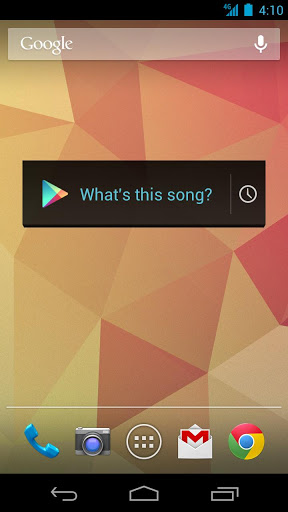
“What's this song?” Starting today, the Sound Search for Google Play widget is available to download from the Play store, so you can start identifying music playing around you, directly from your Android device’s homescreen.
Sometimes, you hear a song you like while you’re out and about but don’t want to download it right at that moment. The Sound Search widget syncs across all of your devices, so that song you recognized with your phone in the coffee shop can be quickly purchased from your tablet at home.
For devices running Android 4.2, you can add the widget directly to your device’s lockscreen, letting you recognize songs without even unlocking your phone, making it even easier for you to catch that song at the club.
The Sound Search for Google Play widget is available on Google Play for devices in the U.S. running Android 4.0 and above. After you’ve installed it, go to the widget picker and drag the Sound Search widget onto your homescreen. You can click on the widget at any time to start recognizing music around you.
Posted by Annie Chen, Software Engineer
New in Google Currents: Scan through your favorite categories, editions and breaking news
Keeping up on the news out there can be overwhelming. That's where Google Currents comes in—an app that allows you to discover, share and read your favorite news outlets, blogs and online magazines (what we together refer to as “editions”) on your smartphone or tablet—even when you’re offline. Currents is filled with great editions like The Los Angeles Times, CBS Sports, Android Central, The Guardian, Shortlist, and Forbes. Today, we’re revamping Currents to make it even easier to scan through all your favorite categories and specific editions with just the swipe of a finger. And, we’re using some of the technology behind Search to bring you breaking stories on those celebrity scandals, that fiscal cliff negotiation or hottest holiday gift.
Scan through categories
We’re now grouping editions into categories to help you keep track of your existing subscriptions and discover new ones. Check out editions related to your interests through categories like Entertainment, Sports, Lifestyle and more. All of your content will be grouped in these categories, accessible from a sidebar. And you can organize your editions in each category with favorites on top.
We’ve also made it easy to quickly browse through top articles from all your favorite editions in a category—just swipe horizontally. If you subscribe to more than a dozen News editions like The Atlantic, ABC News and The Telegraph, you can quickly swipe through the entire category and dive into editions with articles of interest.
Scan through editions
We’ve also made it easier to scan headlines in a particular edition—just swipe vertically. Want to see what’s new in Popular Science? Just swipe through through the headlines. After you view a story we’ll mark it as read, so it’s easier to see new content each time you use Currents.
Scan through breaking stories
To help you stay up-to-date with the latest news, Google Currents now uses some of the technology behind Search to deliver the hottest breaking stories in categories such as World, Entertainment, Sports, Science and more. You’ll find new articles from hot topics that interest you, while discovering existing Currents editions you can subscribe to. Breaking stories are customized to your country and language—so we’ll only show you relevant news.
Currents optimizes editions to look great on whatever type of device you're using. Now articles shine, with larger images and layouts that are intelligently optimized for your device, whether you're on a phone or a tablet. Check out some of our newest featured partners like Cars.com, Voice of America News and New Scientist.
Back in April we expanded Google Currents internationally. Since then millions of readers around the world have downloaded Currents, reading over 700 publisher editions and tens of thousands of self-produced editions. The updated app is now available for download on Google Play and coming soon to iOS. We hope that today’s updates make keeping up with the latest news fast, easy and fun no matter where you are or what device you’re using.
Posted by Mussie Shore, Group Product Manager
Rabu, 05 Desember 2012
New Google Now: the perfect travel companion for the holidays
Now Dasher! Now Dancer! Now, Prancer and Vixen! On, Comet! On, Cupid! On, Donner and Blitzen! For Santa’s holiday travel this season, Google Now is just the prescription.
As you head off this holiday season, the latest update to Google Now makes it even more useful for traveling. Before you even leave your house, Google Now will tell you what the weather will be like at your destination (just in time to make sure you remember to pack those mittens). At the airport, your boarding pass is automatically pulled up, helping you breeze through to the gate (launching shortly for United Airlines, with more to come). And once you've arrived at your destination, Google Now can help you uncover some great activities, by showing you events happening around you, suggesting websites for you to explore as you research things to do, or allowing you to learn more about specific pieces while you’re at a museum (using Google Goggles).
All of this builds on top of some of the other cards designed for travel, like the currency conversion, translation, and flight status cards -- hopefully taking a little bit of the stress out of holiday travel so you can focus on family and fun.
We're also making Voice Search even more powerful: you can find out the name of the song that’s playing (“What’s this song?”), quickly find product info (“Scan this barcode”) and post updates to Google+ simply by using just your voice.
These goodies are waiting for you in the updated Google Search app, available on Google Play for devices running Android 4.1, Jelly Bean, or higher.
Posted by Baris Gultekin, Product Management Director
Rabu, 28 November 2012
Edit spreadsheets on the go with the Drive mobile app
You’re making your list, you’re checking it twice -- and now you can do it from anywhere.
Just in time for this year’s holiday season, you can edit Google Sheets on your mobile device, just like you can with Google Docs. From the Drive app on your Android device, you can create a new spreadsheet or edit an existing one. You can switch fonts, resize columns, sort data, and more. And just like on your computer, you’ll be able to see other people’s edits in real time as they’re made.
Beyond spreadsheets, you may notice a few other tweaks to the Drive app, including better text formatting when you paste from one Google document to another. And from your Android device, you can edit text within tables in documents and add a shortcut on the homescreen of your device to any specific file in Drive.
Whether it’s holiday recipes, shopping lists, or just your family budget, the Drive app on your mobile device makes it easy to get stuff done wherever you are.
Get the Google Drive app today on Google Play.
Posted by Shrikant Shanbhag, Software Engineer
Jumat, 09 November 2012
Google Shopper 3.0 - New features to help with your holiday shopping
As you hit the mall this holiday season, chances are you’ll be accompanied by a reliable personal shopping companion: your mobile phone. Four out of five mobile phone and tablet owners plan to use their device for holiday shopping - for comparing prices, locating nearby stores, and searching for coupons. Today, with the launch of Google Shopper 3.0 for Android, you can easily browse for gift ideas, research products, and locate great deals on the go.
Search for products and get gift ideas on the redesigned home page
The app’s redesigned home screen features a bigger search box for easier navigation. When you browse curated gift ideas and latest trends on the home page or search for apparel and accessories, larger photos let you view product designs in more detail.
Find great sales and special offers
Shopper now makes it quick and easy to find great deals at local and online stores. From the new Sales page, you can view weekly circulars from nearby stores, along with a handful of featured current promotions which you can redeem online or in person. Shopper also shows you store promotions, such as ‘30% off’ or ‘free shipping’, as you search for products in the app.
Use GoodGuide rating to Identify healthy, safe, and eco-friendly products
Whether you shop with a conscience or would like a reason to start, Shopper now features GoodGuide ratings, a rating system that indicates on a scale of one to ten whether a product is healthy, safe and environmentally friendly. When GoodGuide ratings are available for a product, you can view these by scrolling down the product detail screen, as shown below. You can learn more about the GoodGuide rating system here.

You can download Shopper 3.0 for your Android device from Google Play.
Search for products and get gift ideas on the redesigned home page
The app’s redesigned home screen features a bigger search box for easier navigation. When you browse curated gift ideas and latest trends on the home page or search for apparel and accessories, larger photos let you view product designs in more detail.
Shopper now makes it quick and easy to find great deals at local and online stores. From the new Sales page, you can view weekly circulars from nearby stores, along with a handful of featured current promotions which you can redeem online or in person. Shopper also shows you store promotions, such as ‘30% off’ or ‘free shipping’, as you search for products in the app.
Whether you shop with a conscience or would like a reason to start, Shopper now features GoodGuide ratings, a rating system that indicates on a scale of one to ten whether a product is healthy, safe and environmentally friendly. When GoodGuide ratings are available for a product, you can view these by scrolling down the product detail screen, as shown below. You can learn more about the GoodGuide rating system here.
Posted by John Shriver-Blake, Product Manager, Google Shopper
Senin, 29 Oktober 2012
Nexus: The best of Google, now in three sizes
People increasingly have more than one device, and they switch between them many times a day. Nexus—Google’s hardware line for Android devices—gets rid of the hassle. Just sign in with your Google Account and everything is there ready to go, whatever device you’re using: photos, emails, contacts, bookmarks, even your entertainment on Google Play.
Today, we’re excited to announce three great new Nexus devices … in small, medium and large. And they all run Android 4.2, a new flavor of Jelly Bean—which includes the latest version of Google Now and other great new features.
Nexus 4 with Google Now and Photo Sphere
Nexus 4 is our latest smartphone, developed together with LG. It has a quad-core processor which means it's super fast, a crisp 4.7" (320 ppi) display that's perfect for looking at photos and watching YouTube, and with wireless charging you just set the phone down on a charging surface to power it up, no wires needed. While Nexus 4 is incredibly powerful under the hood, it also features the latest version of Jelly Bean, Android 4.2—the simplest and smartest version of Android yet. Starting with the camera, we've reinvented the photo experience with Photo Sphere, which lets you capture images that are literally larger than life. Snap shots up, down and in every direction to create stunning 360-degree immersive experiences that you can share on Google+ with friends and family—or you can add your Photo Sphere to Google Maps for the world to see.
Android 4.2 brings other great goodies like Gesture Typing, which lets you glide your finger over the letters you want to type on the keyboard—it makes typing fast, fun and a whole lot simpler. Android 4.2 also adds support for wireless display so you can wirelessly watch movies, YouTube videos and play games right on your Miracast-compatible HDTV.
Learn more about all of the new features in Android 4.2, Jelly Bean, here.
Google Now—even more useful
We designed Google Now to make life simpler by giving you the right information at just the right time in easy to read cards, before you even ask. And the feedback has been awesome. So today we’re adding more cards that we hope you’ll find useful. Flight information, restaurant reservations, hotel confirmations and shipping details—how often have you found yourself wading through your email to get this information at the last moment? So next time you book a table for dinner, you’ll get a reminder with all the details without ever having to lift a finger. You’ll also get cards for nearby attractions, interesting photo spots, movies times at nearby theaters or concerts by your favorite artists.
Nexus 7: Thin, light and now even more portable
Nexus 7 brings you the best of Google–YouTube, Chrome, Gmail, Maps–and all the great content from Google Play in a slim, portable package that fits perfectly in your hand. To give you more room for all that great content you can now get Nexus 7 with 16GB ($199) or 32GB ($249) of storage. But we also wanted to make this highly portable tablet even more mobile. So we added HSPA+ mobile data. Nexus 7 is now also available with 32GB and HSPA+ mobile ($299), which can operate on more than 200 GSM providers worldwide, including AT&T and T-Mobile in the US.
Nexus 10: Powerful and shareable
Nexus 10 is the ultimate tablet for watching movies or reading magazines. We wanted to build a premium entertainment device, so we partnered with Samsung to do just that. Nexus 10 is the highest resolution tablet on the planet with a 10.055" display at 2560-by-1600 (300ppi), that's over 4 million pixels right in your hands. It comes with a powerful battery that will get you up to nine hours of video playback and more than 500 hours of standby time. With a set of front-facing stereo speakers, you can watch movies right from your Nexus 10 and they simply sound awesome. But what makes Nexus 10 unique is that it's the first truly shareable tablet. With Android 4.2, you can add multiple users and switch between them instantly right from the lockscreen. We believe that everyone should have quick and easy access to their own stuff -- email, apps, bookmarks, and more. That way, everyone can have their own home screens, their own music, and even their own high scores.
Google Play: More entertainment, more countries
We’ve recently added a ton of great new entertainment to Google Play, such as movies and TV shows from Twentieth Century Fox. Earlier this year we expanded our service beyond movie rentals and now you can purchase movies and build a library of your favorites in Google Play. Today we’re bringing movie purchasing to more countries - Canada, the U.K., France, Spain and Australia.
We’re also excited to announce two new partnerships. We’re now working with Time, Inc. to bring you even more magazines like InStyle, PEOPLE, TIME and others. And we’ve partnered with Warner Music Group who will be adding their full music catalog with new songs coming each day. We’re now working with all of the major record labels globally, and all the major U.S. magazine publishers, as well as many independent labels, artists and publishers.
On November 13, we're bringing music on Google Play to Europe. Those of you in the U.K, France, Germany, Italy and Spain will be able to purchase music from the Google Play store and add up to 20,000 songs—for free—from your existing collection to the cloud for streaming to your Android devices or web browser. We’re also launching our new matching feature to streamline the process of uploading your personal music to Google Play. We’ll scan your music collection and any song we match against the Google Play catalog will be automatically added to your online library without needing to upload it, saving you time. This will be available in Europe at launch on November 13 and is coming to the U.S. soon after. This will all be for free—free storage of your music, free matching, free syncing across your devices and free listening.
Great value
We’ve always focused on building great devices at great value. And we think today’s devices offer the very best that money can buy. Here are more details on when and where you can pick up your next Nexus device:
Posted by Andy Rubin, SVP, Mobile and Digital Content
Today, we’re excited to announce three great new Nexus devices … in small, medium and large. And they all run Android 4.2, a new flavor of Jelly Bean—which includes the latest version of Google Now and other great new features.
Nexus 4 with Google Now and Photo Sphere
Nexus 4 is our latest smartphone, developed together with LG. It has a quad-core processor which means it's super fast, a crisp 4.7" (320 ppi) display that's perfect for looking at photos and watching YouTube, and with wireless charging you just set the phone down on a charging surface to power it up, no wires needed. While Nexus 4 is incredibly powerful under the hood, it also features the latest version of Jelly Bean, Android 4.2—the simplest and smartest version of Android yet. Starting with the camera, we've reinvented the photo experience with Photo Sphere, which lets you capture images that are literally larger than life. Snap shots up, down and in every direction to create stunning 360-degree immersive experiences that you can share on Google+ with friends and family—or you can add your Photo Sphere to Google Maps for the world to see.
Android 4.2 brings other great goodies like Gesture Typing, which lets you glide your finger over the letters you want to type on the keyboard—it makes typing fast, fun and a whole lot simpler. Android 4.2 also adds support for wireless display so you can wirelessly watch movies, YouTube videos and play games right on your Miracast-compatible HDTV.
Learn more about all of the new features in Android 4.2, Jelly Bean, here.
Google Now—even more useful
We designed Google Now to make life simpler by giving you the right information at just the right time in easy to read cards, before you even ask. And the feedback has been awesome. So today we’re adding more cards that we hope you’ll find useful. Flight information, restaurant reservations, hotel confirmations and shipping details—how often have you found yourself wading through your email to get this information at the last moment? So next time you book a table for dinner, you’ll get a reminder with all the details without ever having to lift a finger. You’ll also get cards for nearby attractions, interesting photo spots, movies times at nearby theaters or concerts by your favorite artists.
Nexus 7: Thin, light and now even more portable
Nexus 7 brings you the best of Google–YouTube, Chrome, Gmail, Maps–and all the great content from Google Play in a slim, portable package that fits perfectly in your hand. To give you more room for all that great content you can now get Nexus 7 with 16GB ($199) or 32GB ($249) of storage. But we also wanted to make this highly portable tablet even more mobile. So we added HSPA+ mobile data. Nexus 7 is now also available with 32GB and HSPA+ mobile ($299), which can operate on more than 200 GSM providers worldwide, including AT&T and T-Mobile in the US.
Nexus 10: Powerful and shareable
Nexus 10 is the ultimate tablet for watching movies or reading magazines. We wanted to build a premium entertainment device, so we partnered with Samsung to do just that. Nexus 10 is the highest resolution tablet on the planet with a 10.055" display at 2560-by-1600 (300ppi), that's over 4 million pixels right in your hands. It comes with a powerful battery that will get you up to nine hours of video playback and more than 500 hours of standby time. With a set of front-facing stereo speakers, you can watch movies right from your Nexus 10 and they simply sound awesome. But what makes Nexus 10 unique is that it's the first truly shareable tablet. With Android 4.2, you can add multiple users and switch between them instantly right from the lockscreen. We believe that everyone should have quick and easy access to their own stuff -- email, apps, bookmarks, and more. That way, everyone can have their own home screens, their own music, and even their own high scores.
Google Play: More entertainment, more countries
We’ve recently added a ton of great new entertainment to Google Play, such as movies and TV shows from Twentieth Century Fox. Earlier this year we expanded our service beyond movie rentals and now you can purchase movies and build a library of your favorites in Google Play. Today we’re bringing movie purchasing to more countries - Canada, the U.K., France, Spain and Australia.
We’re also excited to announce two new partnerships. We’re now working with Time, Inc. to bring you even more magazines like InStyle, PEOPLE, TIME and others. And we’ve partnered with Warner Music Group who will be adding their full music catalog with new songs coming each day. We’re now working with all of the major record labels globally, and all the major U.S. magazine publishers, as well as many independent labels, artists and publishers.
On November 13, we're bringing music on Google Play to Europe. Those of you in the U.K, France, Germany, Italy and Spain will be able to purchase music from the Google Play store and add up to 20,000 songs—for free—from your existing collection to the cloud for streaming to your Android devices or web browser. We’re also launching our new matching feature to streamline the process of uploading your personal music to Google Play. We’ll scan your music collection and any song we match against the Google Play catalog will be automatically added to your online library without needing to upload it, saving you time. This will be available in Europe at launch on November 13 and is coming to the U.S. soon after. This will all be for free—free storage of your music, free matching, free syncing across your devices and free listening.
Great value
We’ve always focused on building great devices at great value. And we think today’s devices offer the very best that money can buy. Here are more details on when and where you can pick up your next Nexus device:
- Nexus 4: 8GB for $299; 16GB for $349; available unlocked and without a contract on 11/13 on the Google Play store in U.S., U.K., Australia, France, Germany, Spain and Canada. The 16GB version will also be available through T-Mobile for $199, with a 2-year contract (check here for more details).
- Nexus 7: 16GB for $199 and 32GB for $249; available in U.S., U.K., Australia, France, Germany, Spain, Canada and Japan, and also through our retail partners Gamestop, Office Depot, Office Max, Staples and Walmart.
- Nexus 7 with 32GB and mobile data: $299 and unlocked, on sale 11/13 in the Google Play store in the U.S., U.K., Australia, France, Germany, Spain and Canada.
- Nexus 10: 16GB for $399; 32GB for $499; available on 11/13 in the Google Play Store in the U.S., U.K., Australia, France, Germany, Spain, Canada and Japan. You'll also be able to purchase the 32GB version in over 2,000 Walmart stores in the U.S.
Posted by Andy Rubin, SVP, Mobile and Digital Content
Langganan:
Postingan (Atom)